
POP API FAQs
How to check API Usage
1. Log Into Your POP Account
2. Navigate to Your Account Settings
- Click on Account Settings or Billing to view subscription details.
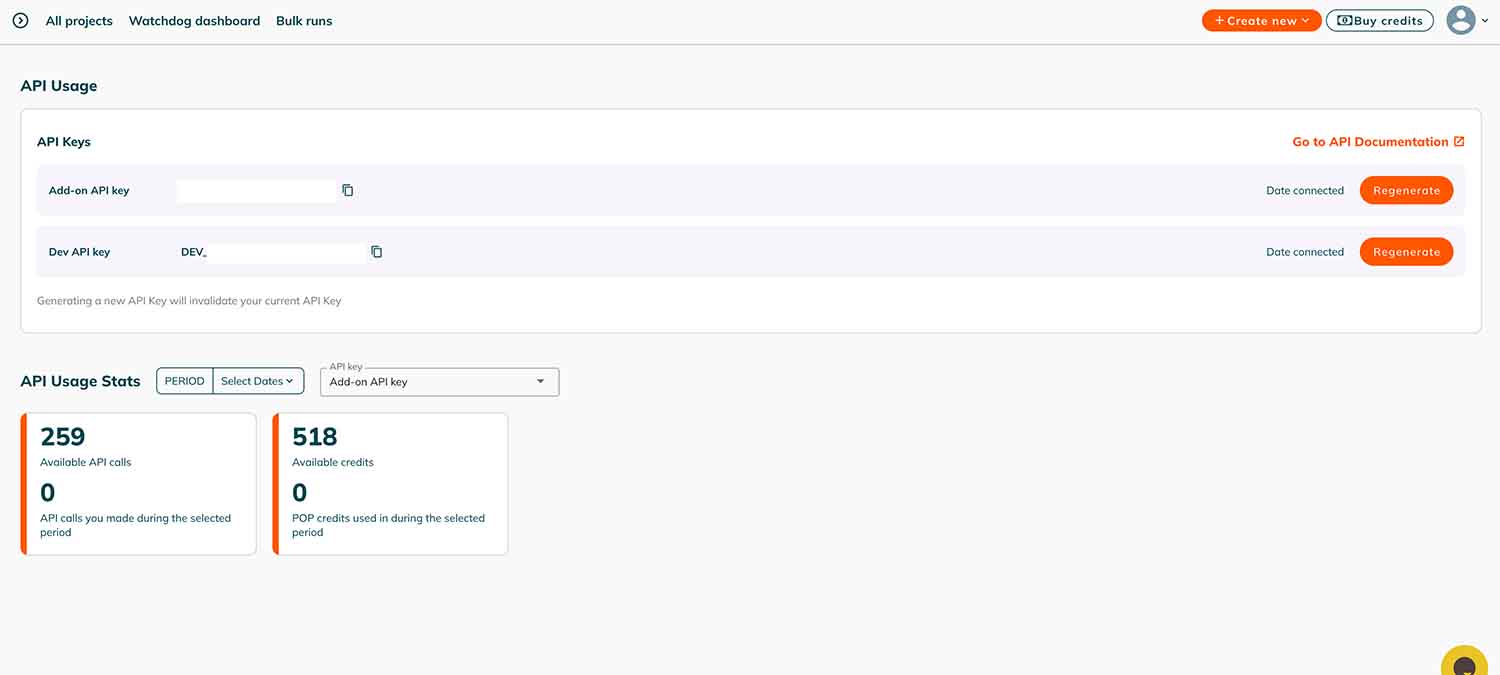
- Within the account settings, find the API or API Usage tab.
- This section will show your API key, usage statistics, and remaining POP credits.
3. Review Usage Metrics
The API usage dashboard typically provides:
- Total API Calls Made: Number of requests sent during the billing cycle.
- Remaining Credits: How many POP credits are still available.
- Billing Cycle Information: Dates indicating when credits will reset.
- Detailed Logs: Some accounts may display timestamps of each API call for audit purposes.
How to Generate an API Key
- Log into Your POP Account:
- Navigate to Your Account Settings
- Click on Account Settings or Billing to view subscription details.
- Within the account settings, find the API or API Usage tab.
- This section will show your API key, usage statistics, and remaining POP credits.
- Subscribe to the API Add-On:
- Within the account settings, go to the Billing & Payments section.
- Locate the API Add-ons option and subscribe to the API service, which is available for an additional $10 per month.
- Generate Your API Key:
- After subscribing, return to the Account Settings.
- Navigate to the API Access section.
- Here, you can generate and view your unique API key. Ensure you store this key securely, as it authenticates your API requests.
How to add developers to your API?
To grant developers access to your PageOptimizer Pro (POP) API, follow these steps:
- Subscribe to the API Add-On:
- Log in to your POP account.
- Navigate to Account Settings > Billing & Payments > API Add-ons.
- Purchase the API add-on for $10 per month.
- Generate an API Key:
- After subscribing, go to the API Access section in your account settings.
- Generate your unique API key, which will authenticate API requests.
- Share API Documentation:
- Provide your developers with access to the POP API Documentation, which details available endpoints, request formats, and integration guidelines.
- Manage API Usage:
- Each API call consumes POP credits (1 API call = 2 POP credits).
- Monitor usage to ensure sufficient credits are available for your developers' needs.
By completing these steps, your developers will have the necessary access and resources to integrate POP's SEO functionalities into your applications effectively.
API calls exchange rates
What is the difference between the Add-on API and the API for Developers?
The Add-On API is designed for individual users who want to integrate PageOptimizer Pro’s (POP) features into their workflow. It costs $10/month and consumes 2 POP credits per call, with a 100-call limit for Unlimited plan users. It’s ideal for personal SEO management without heavy API usage.
The API for Developers, on the other hand, is built for larger teams and enterprises needing scalable solutions. It requires a one-time $50 fee, then allows bulk purchases ranging from 2,100 to 22,000 API calls. For high-volume needs, a custom partnership program is available. This option suits developers integrating SEO into multiple projects.